
More and more people ask ChatGPT, Perplexity, Claude or Gemini which product to buy. The AI then names a few shops and products. Whether yours is among them does not depend on ad budget, but on whether the AI can read, understand and cite your shop.
This guide shows how to prepare a JTL-Shop 5 for that. Each step is described once as you do it by hand, and once as my plugin NZ GEO Visibility handles it. So you can do both: implement it yourself or take the shortcut.
Step 1: Check what AI knows about your shop today
Before you change anything, look at the current state:
- Ask ChatGPT and Perplexity about your shop and about typical buying questions in your industry. Is your shop mentioned? Are prices and range correct?
- Open yourshop.com/robots.txt and check whether AI bots such as GPTBot, OAI-SearchBot or PerplexityBot are blocked. Some hosts and security plugins block them across the board.
- Check your server logs or statistics for visitors from chatgpt.com or perplexity.ai.
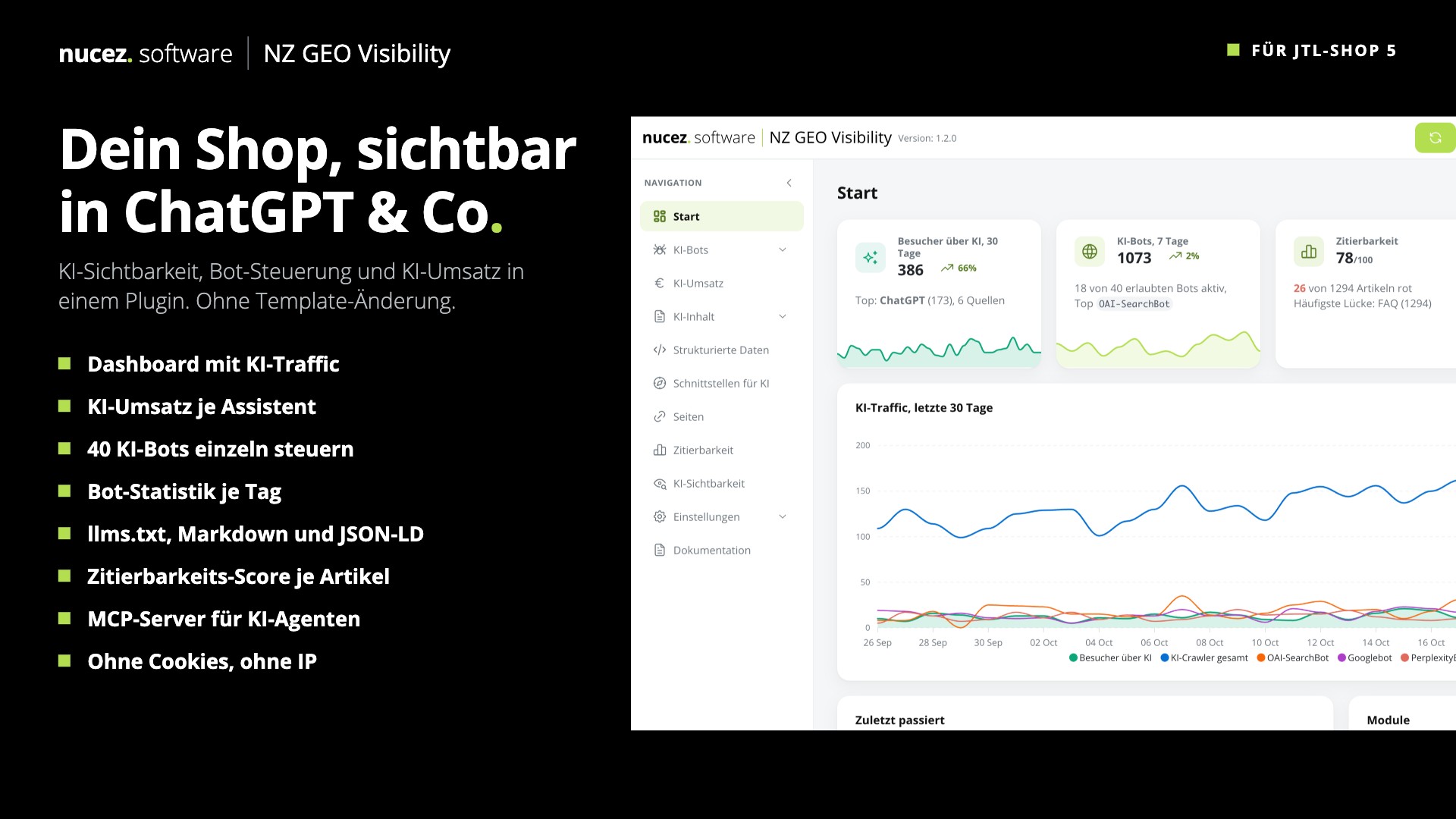
With NZ GEO Visibility: The dashboard shows visitors via AI, active AI bots, the citability score and AI traffic over the last 30 days at a glance. Optionally, the plugin checks with your own questions whether ChatGPT or Claude mention your shop.
Step 2: Allow AI bots in the robots.txt
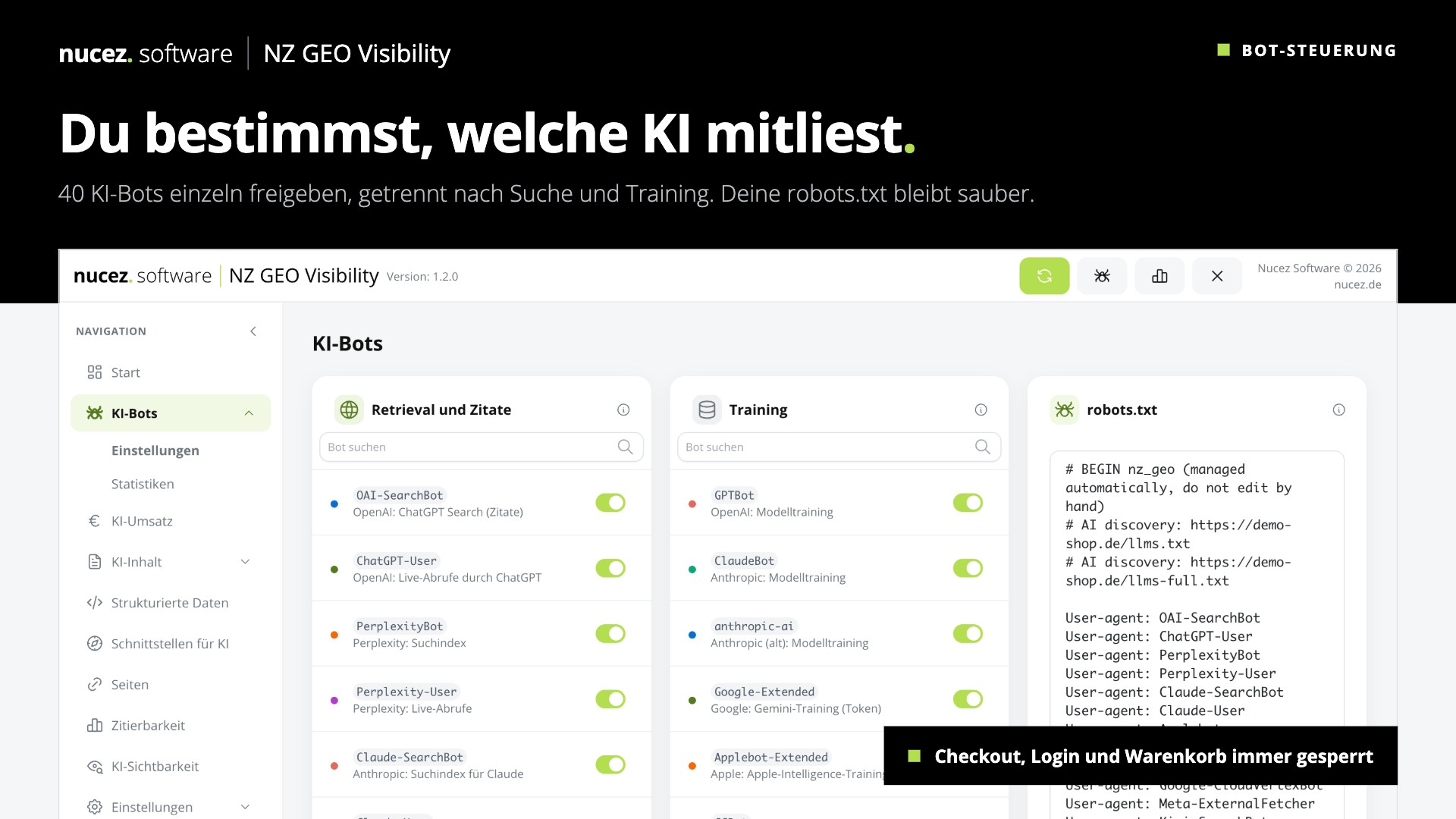
AI services send two kinds of bots. Some search and cite (such as OAI-SearchBot, PerplexityBot, Claude-SearchBot). They make your shop show up in answers. Others collect data for training (such as GPTBot, ClaudeBot, Google-Extended).
- Allow search and citation bots if you want to appear in AI answers.
- Allow or block training as you see fit.
- Block checkout, login and cart for all bots.
With NZ GEO Visibility: 40 AI bots can be switched individually, split into search and training. The plugin writes its own block into the robots.txt, your own rules stay in place. It does not control Google Search or Bing.
Step 3: Create an llms.txt
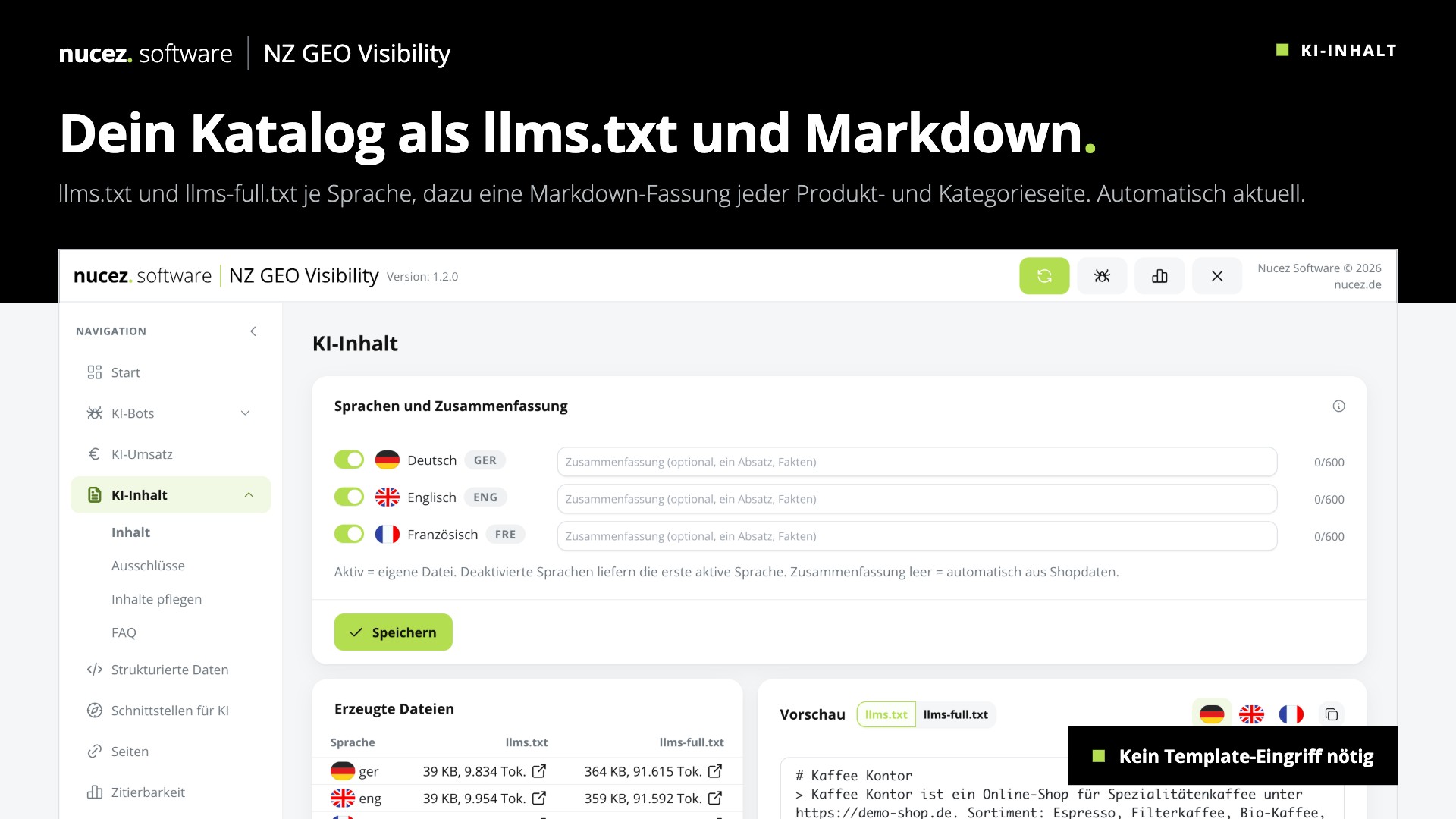
The llms.txt is a Markdown file in the shop's root directory. It summarises what your shop is, what it sells and where the most important pages are. More in the article What is llms.txt?.
- By hand: write a file with shop description, categories, important pages (shipping, returns, contact) and links, and upload it via FTP to the shop root.
- The catch: a hand-written file goes out of date as soon as range or prices change. With several languages you need one version per language.
With NZ GEO Visibility: llms.txt and llms-full.txt are generated automatically from the shop data, per language, and stay up to date. On top, every product, category, content and blog page gets a .md and .json version that AI can read without navigation and scripts.
Step 4: Maintain complete product data in JTL-Wawi
AI compares products by unambiguous data. What only appears in running text is easily overlooked or misrepresented.
- Maintain GTIN (EAN) and manufacturer for every product. This is how an AI identifies a product unambiguously.
- Maintain dimensions, weight, colour, material as characteristics or attributes, not only in the description.
- Keep description, image and stock complete.
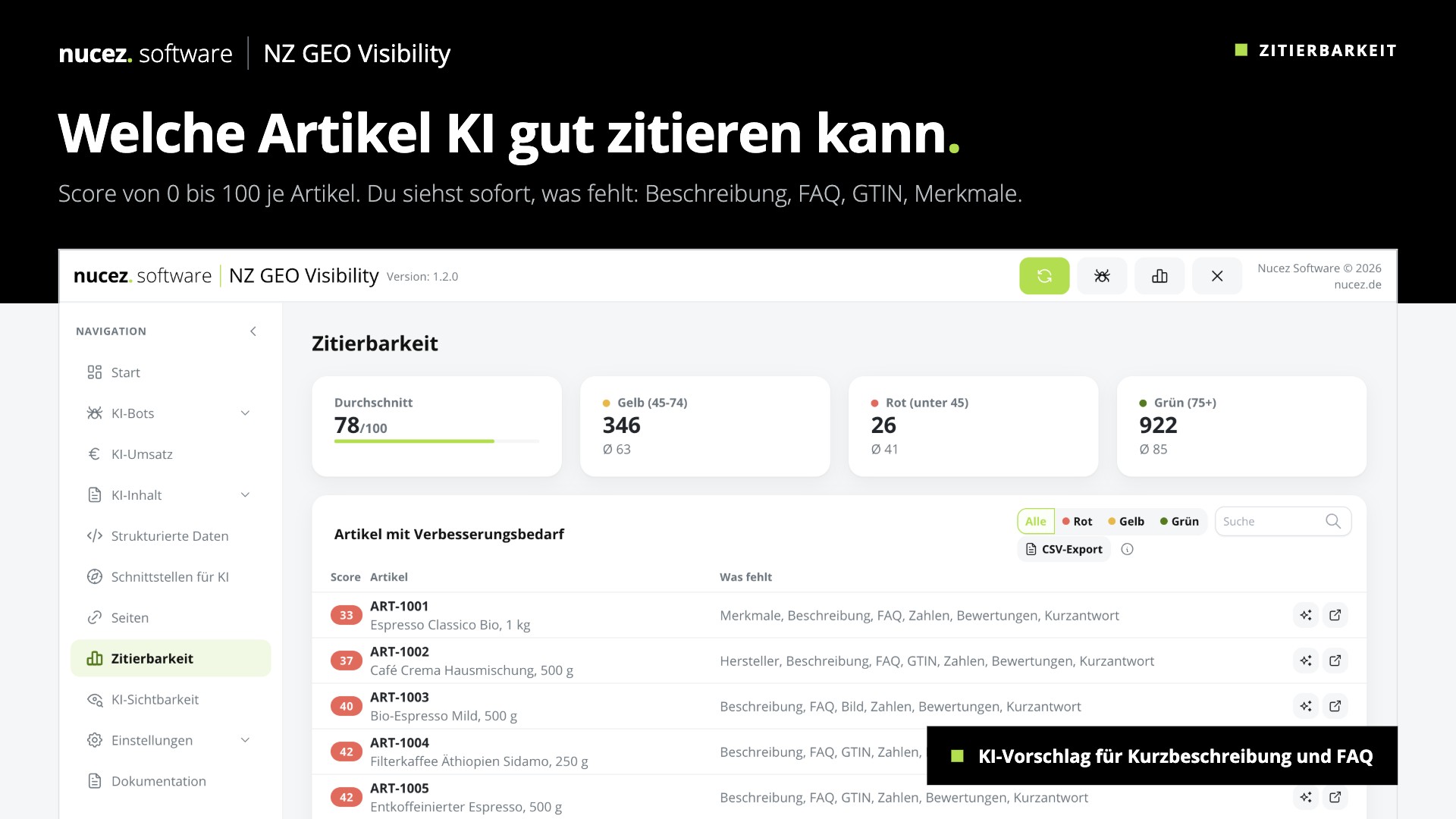
With NZ GEO Visibility: The citability score rates every product from 0 to 100 points. The "What is missing" column shows exactly what is missing in the Wawi, such as GTIN, manufacturer, image or FAQ. Worst products first, with CSV export.
Step 5: Make prices, stock and terms machine-readable
Prices, delivery time and stock must be in the HTML, not loaded later by script. Structured data (JSON-LD) helps on top: it tells Google and AI unambiguously what product, price, availability, shipping and returns are.
- By hand: add JSON-LD for Product and Offer to the template, plus shipping and return details. Check it with Google's Rich Results Test.
- Important: output net or gross prices the way guests see them.
With NZ GEO Visibility: The plugin outputs JSON-LD for product, offer, shipping, returns, reviews, breadcrumbs and FAQ, without template changes. If the shop is set to "prices only after login", prices are dropped from all AI output automatically.
Step 6: Answer concrete questions
AI often breaks a buying question into many small sub-questions: what does shipping cost? Can I return it? Is it in stock? Shops that answer these clearly and briefly get cited more often than shops with general marketing copy.
- Create an FAQ on shipping, payment, prices, returns and contact.
- Answer typical questions directly on important category and product pages.
With NZ GEO Visibility: "Generate from shop data" creates an FAQ on shipping, payment, prices, returns and contact in all languages and also outputs it as JSON-LD. Clicking again updates the answers.
Step 7: Measure what AI brings
Without numbers you do not know whether the effort pays off. Two figures count:
- Bot requests: which AI bots read which pages and how often?
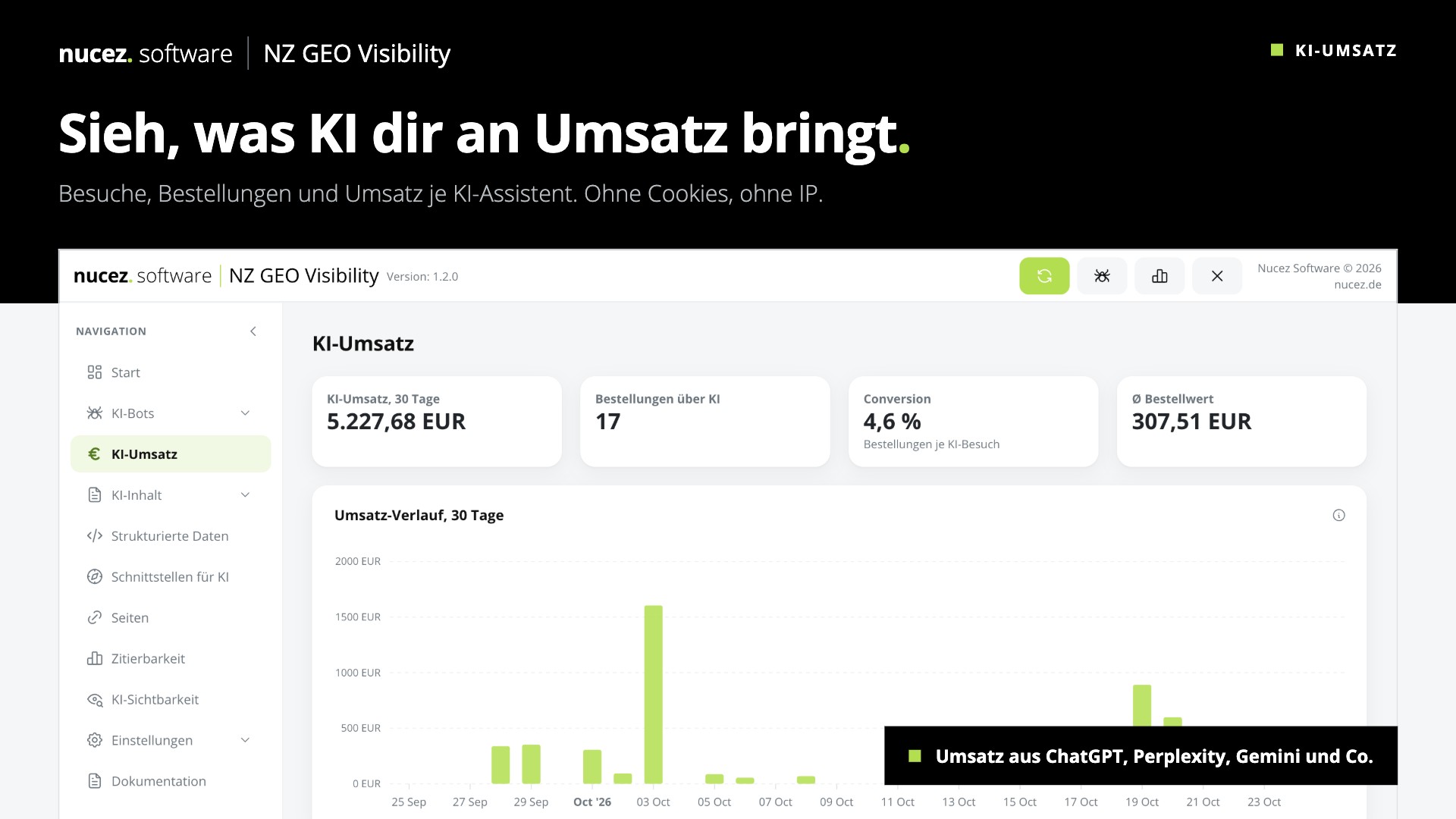
- Visitors and revenue via AI: how many visitors come via ChatGPT, Perplexity and co., and what do they buy?
With NZ GEO Visibility: The statistics show requests per AI bot and day and the most-read pages. The AI revenue area shows revenue, orders, conversion and order value per AI assistant, without cookies and without IP addresses.
Outlook: agentic commerce and MCP
The next step is AI agents that shop on their own. They query catalogs directly instead of reading pages. That is what the Model Context Protocol (MCP) is for: an interface through which Claude, ChatGPT and other agents fetch products, prices and availability.
With NZ GEO Visibility: The plugin includes an MCP server and a product feed, both read-only and rate-limited. You add the shop as a connector in Claude or ChatGPT and see what an agent learns about your range.
Frequently asked questions
Do I need a plugin for AI visibility? No. All steps can be done by hand. A plugin mainly saves ongoing maintenance: llms.txt, JSON-LD and FAQ stay up to date automatically, and you see what AI brings.
Does this block Google and Bing? No. Bot control only affects AI bots. Google Search and Bing keep following your own rules.
Does the shop expose customer data? Not if you do it right. Only public shop data belongs in llms.txt, feed, MCP and JSON-LD. NZ GEO Visibility exposes no customer data, all interfaces are read-only.
Which JTL version does this apply to? The steps apply in general. NZ GEO Visibility runs on JTL-Shop 5.5 to 5.8 with PHP 8.2 to 8.4.
Take the shortcut with NZ GEO Visibility
NZ GEO Visibility handles all seven steps in one plugin, without template changes and with data straight from the shop and JTL-Wawi. You can try it free for 14 days.
- NZ GEO Visibility in the JTL Extension Store
- Documentation: installation and setup (German)
- More about the plugin and screenshots
Need something custom for your JTL-Shop or JTL-Wawi? Take a look at my JTL extensions and plugins.